Printing Draft Forms
A saved Medication Review (with all fields populated) can be printed prior to completing it. Printing a draft Medication Review is useful in situations wherethere is have limited access to a computer or mobile tablet. Blank Medication Review (without populated fields) in situations where you want to print and complete the Medication Review by hand.
 Printing a Saved Medication Review
To print a saved medication review:
- Launch a new or saved medication review.
- Enter information in the various fields as necessary.
- Select Save.

Note: If Save is not selected before proceeding to the next step, medication review will be saved automatically.
- Select Print Draft.

The Print Options window appears. - Select the following information:
- The pages that should print
- Print Draft radio button
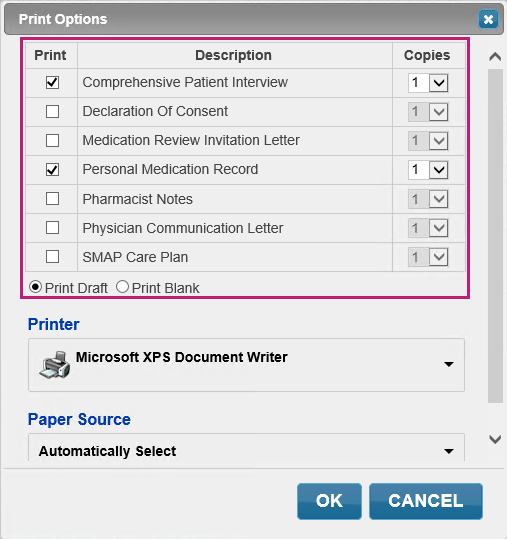
- Select OK. The medication review is printed.
Printing a Blank Medication Review
To print a blank medication review:
- Launch a new or saved medication review.
- Select Print Draft.

The Print Options window appears. - Select the following information:
- The pages that should print
- Print Blank radio button.
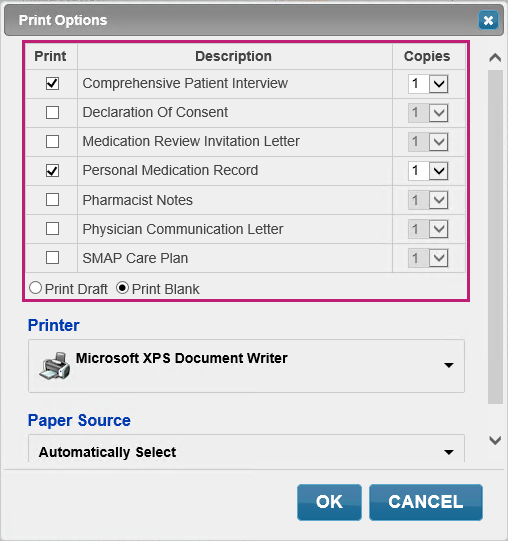
- Select OK. The medication review is printed.